Your 256GB Mac mini is too small. You need Elbowroom.
tl;dr - Elbowroom is a mac app that shows what is taking up space on your Mac, explains what it belongs to, and helps you reclaim files your tools can regenerate.
When the M4 Mac mini came available for $599, I knew it was a really good deal and bought one immediately. I also knew that 256GB was too small, and I would likely suffer, but that didn't stop me. I bought an external 2 TB SSD and figured that would be enough to navigate around that shortage of storage.
Long story short, it's not that easy. Mac prefers the OS disk for many things, including its massive simulator devices that take up gigabytes of spaces. Not to mention space for updates, caches, etc. It adds up quick and it doesn't take long before your computer suddenly stops doing anything at all because you're down to the last megabyte.
There's tools for this! DaisyDisk and Grand Perspective are two tools I've used in the past that make it super easy to drill down into a disk and figure out what's taking up storage. The problem I have with those tools is that just knowing where space is being taken up doesn't necessarily give you a next step. Questions start piling up. Is there a safe way to delete this? Should I even delete it or will it break some other thing? Will it automatically get refetched if I do delete it?
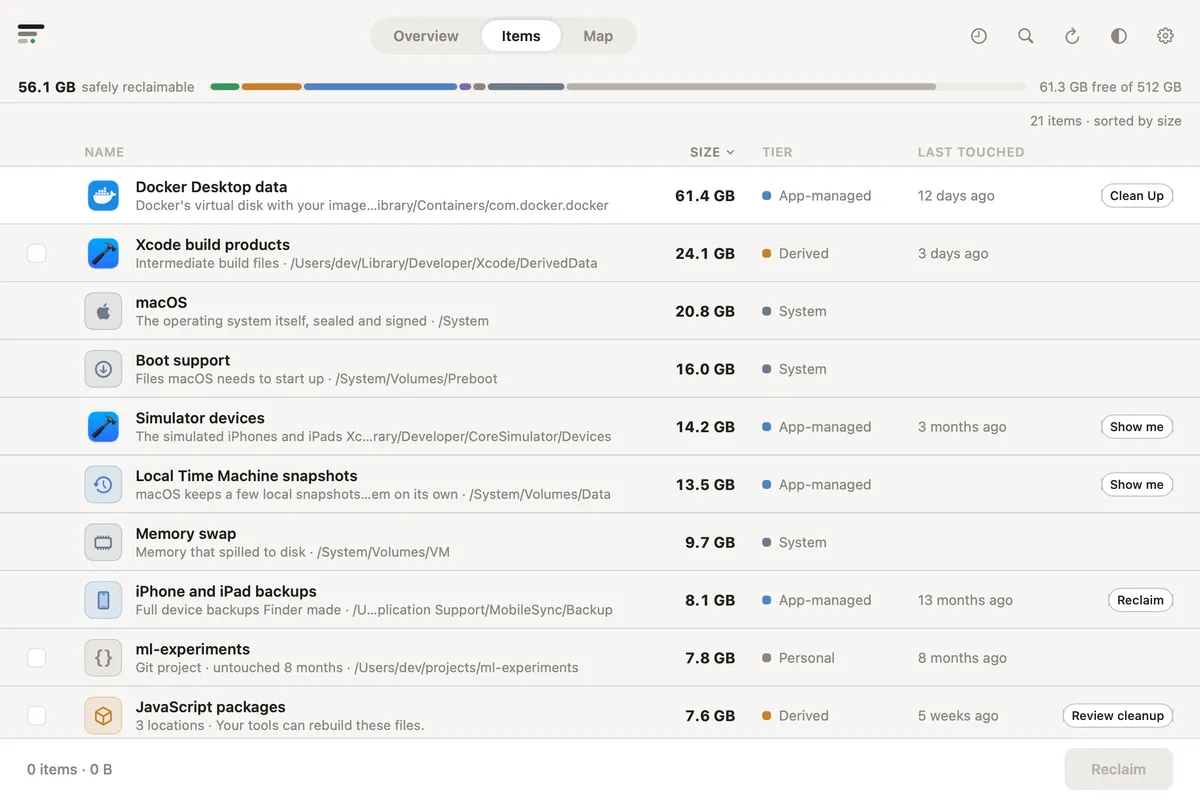
I built Elbowroom to help answer those questions and to better categorize where space is being taken. Instead of a strange filename that you end up Googling (or maybe your LLM already knows), you have a clear label and description explaining what the thing is and whether it's safe to delete. Elbowroom even shows you things in the system that take up a lot of space that you shouldn't delete.
There's more screenshots in the repo, so go check them out, but this is my favorite tab - it lists all of the things taking up space on your machine, categorized, and listed in descending order based on size.
Download the latest version on the releases page.